
Building Your First Diamond

Create a working diamond project using Compose then explore every file so you know exactly what you have.

This tutorial uses the Counter example: a minimal diamond with increment and read functions. It's the simplest way to see how diamonds works end-to-end.

Prerequisites​

1. Scaffold the project​

Run the Compose CLI with npx

npx @perfect-abstractions/compose-cli init

You'll be prompt with lot of different options from framework, ERC standards templates, and others.

For this tutorial, we will choose the Counter example with the following options:

Enter project name: my-diamond
Select project framework: Foundry
Select base: Counter
Select upgradeability: Immutable (no upgrade facet)
Select extension facets: None
Select Compose library facets: None
Select ownership: None
Select access control: None

? Install project dependencies? (Y/n) Yes

Take the time to review the full library available to you. We support most major token standards like ERC20, ERC721 with different type of access control.

You can always skip the interactive prompts entirely:

npx @perfect-abstractions/compose-cli init my-first-diamond --framework foundry --base counter --yes

When the CLI finishes, follow the next steps instruction to move into your project and test it:

✔ Project "my-first-diamond" scaffolded in ".../my-first-diamond"

Next steps:
1. cd "my-first-diamond"
2. forge test

2. Explore the project structure​

The scaffold generates a diamond with two local facets and one from the Compose library.

src/
Diamond.sol ← proxy: wires everything together
facets/
CounterDataFacet.sol ← get the current count
CounterIncrementFacet.sol ← increment the counter

Each facet owns a slice of the applicstion logic. CounterDataFacet exposes the count, CounterIncrementFacet mutates it. The Diamond.sol proxy routes calls to the right logic block via function selectors.

Diamond.sol: The proxy​

The diamond is the application entrypoint. Users call it, but it holds no logic itself, only the storage state. Every call is delegated to a stateless facet via the fallback function:

contract Diamond {
constructor(address[] memory _facets) {
// Add all the facets address provided to constructor
DiamondMod.addFacets(_facets);
}

fallback() external payable {
DiamondMod.diamondFallback();
}

receive() external payable {}
}

When a function is called on the diamond, DiamondMod.diamondFallback() looks up which contract owns that selector and forwards the call.
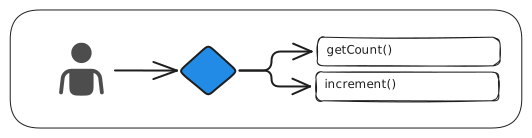
Diagram showing a call being routed through the diamond proxy to the getCount() and increment() facets

There nothing more to make a diamond proxy work. Now, let's transition where our application logic lives

CounterDataFacet.sol​

Facet are where you implement your application logic. Think of it as stateless logic block that borrow the diamond storage to handle any data.

contract CounterDataFacet {
// 1. Slot address: a deterministic location shared across the diamond
bytes32 constant STORAGE_POSITION = keccak256("counter");

// 2. Data struct: defines the shape of data stored at that slot:
struct CounterStorage {
uint256 count;
}

// 3. Assembly storage getter: `storage` reference pointer to that slot:
function getStorage() internal pure returns (CounterStorage storage s) {
bytes32 position = STORAGE_POSITION;
assembly {
s.slot := position
}
}

// ----------------------------------
// Facet functions
// ----------------------------------

function getCount() external view returns (uint256) {
return getStorage().count;
}

// Declares which selectors this facet registers on the diamond proxy
function exportSelectors() external pure returns (bytes memory) {
return bytes.concat(this.getCount.selector);
}
}

Any facet that need Counter data uses the same STORAGE_POSITION = keccak256("counter") and CounterStorage struct. They never import each other. They just agree on the same storage contract.

3. Build and test​

Now let's compile and run the tests:

forge build
forge test -vv

You should see compilation succeed and one passing test in /test/Diamond.t.sol

The test deploys a diamond with all three facets the Counter needs, then calls facetAddresses() on DiamondInspectFacet to verify the right number of facets are registered.

4. Write your own test​

Let's interact with the Counter through a test. Open test/Diamond.t.sol and take a look at what's already there:

// SPDX-License-Identifier: MIT
pragma solidity ^0.8.30;

import {Test} from "forge-std/Test.sol";
import {Diamond} from "../src/Diamond.sol";
import {CounterDataFacet} from "../src/facets/CounterDataFacet.sol";
import {CounterIncrementFacet} from "../src/facets/CounterIncrementFacet.sol";
import {DiamondInspectFacet} from "@perfect-abstractions/compose/diamond/DiamondInspectFacet.sol";

contract DiamondTest is Test {
Diamond diamond;

// This setup function runs before each test
function setUp() public {
address[] memory facets = new address[](3);

// 1. Deploying the Counter specific facets
facets[0] = address(new CounterDataFacet());
facets[1] = address(new CounterIncrementFacet());

// 2. Deploying the required Inspection Facet from @perfect-abstractions/compose
facets[2] = address(new DiamondInspectFacet());

// 3. Deploying your proxy with all 3 addresses passed to the constructor
diamond = new Diamond(facets);
}

function test_inspect_facetAddresses() public view {
DiamondInspectFacet inspect = DiamondInspectFacet(address(diamond));
address[] memory addresses = inspect.facetAddresses();
assertEq(addresses.length, 3);
}
}

The test file already has a setUp() function that deploys a fresh Diamond instance before each test. There's also one test that verifies all three facets are properly registered on the proxy.

Take a look at the order here. The facets are deployed first as separate contracts, then the proxy is created with references to those pre-deployed facet addresses.

This is the core of composition over inheritance. Instead of a monolithic contract that is everything through inheritance chains, the Diamond has the facets it needs.

They're composed at runtime via the constructor or the upgrade functionality.

Now let's add a test that actually uses our Counter. Add this function inside the DiamondTest contract:

function test_counter_incrementAndRead() public {
// Unique address entrypoint
address diamondAddress = address(diamond);

// Cast diamond to both facet interfaces
CounterIncrementFacet incrementer = CounterIncrementFacet(diamondAddress);
CounterDataFacet getter = CounterDataFacet(diamondAddress);

// Initial count should be 0
assertEq(getter.getCount(), 0);

// Increment through one facet
incrementer.increment();

// Counter should now be 1
assertEq(getter.getCount(), 1);

// Increment again by 2 (counter should now be 3)
incrementer.incrementBy(2);
assertEq(getter.getCount(), 3);
}

Run the test suite:

forge test

All tests pass, demonstrating that data written by one facet is immediately visible to another through the diamond's shared storage.

5. Deploy locally​

Start a local Ethereum node in one terminal:

anvil

In a second terminal, plan the deployment and generate the managed script:

npx compose deploy

npx compose deploy plans the deployment from compose.json and writes script/ComposeDeploy.s.sol.

Always review the script, then broadcast it with Anvil's test key:

npx compose deploy --broadcast -- --private-key 0xac0974bec39a17e36ba4a6b4d238ff944bacb478cbed5efcae784d7bf4f2ff80

The deployment is verified and recorded in compose.lock.

You'll see the diamond address logged as the script runs:

== Logs ==
Diamond: 0xCf7Ed3AccA5a467e9e704C703E8D87F634fB0Fc9

Congratulations!​

You just deployed your first diamond application.

We've scaffolded together a Counter project using the CLI, written tests that verify shared storage across facets, and deployed a composed system to a local network.

We recommend you to explore all the template available to scaffold. Use the npx compose catalog command to review what's available to you.

What's next?​

Newsletter

Get notified about releases, feature announcements, and technical deep-dives on building smart contracts with Compose.

No spam. Unsubscribe anytime.